
How to Photograph Jewelry Stamps With a Phone Camera
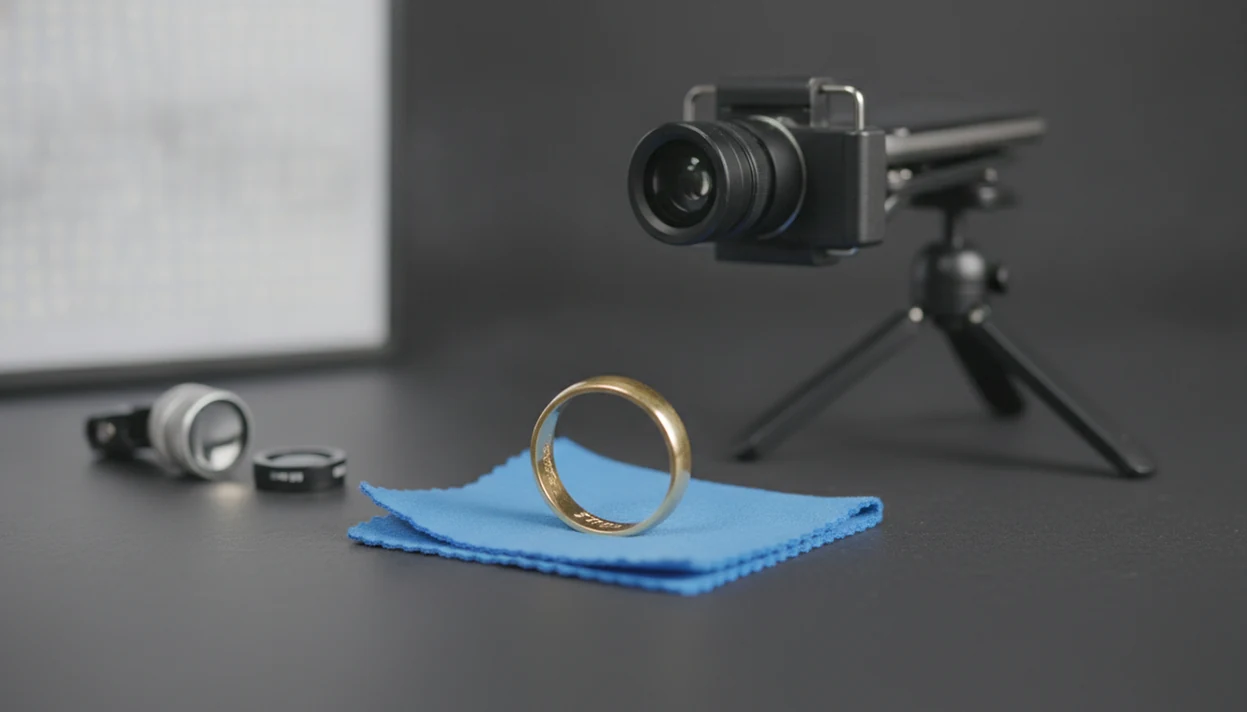


To get a readable close-up, how to photograph jewelry stamps with phone cameras comes down to clean metal, soft side light, steady support, macro focus, and a tight crop. Avoid digital zoom and direct flash; use macro mode, a clip-on macro lens, or a 10x jeweler’s loupe against the camera when the stamp is too small.
Photographing jewelry hallmarks means capturing tiny stamped letters, numbers, symbols, or maker marks clearly enough for a person, app, or jeweler to read them from an image.
- Clean the ring or jewelry first because dust and fingerprints look much larger in macro photos.
- Use diffused light from the side, not direct phone flash, to keep metal glare from hiding the stamp.
- Take one full-context photo and one sharp close-up so Jewelry Identifier or an expert can interpret the mark with the whole piece.
At-a-Glance Setup for Phone Macro Jewelry Stamps
For phone macro jewelry stamps, the fastest setup is a clean cloth, plain matte background, soft side light, steady phone support, and a macro aid if your phone cannot focus close enough. Take one full photo of the whole piece, then one tight close-up of the stamp.
Most people already have the necessary camera: Pew Research Center reports that 90% of U.S. adults owned a smartphone in 2023 (https://www.pewresearch.org/internet/fact-sheet/mobile/).
A full jewelry shot plus a close-up prevents guesswork. A 14K stamp inside a yellow-gold ring tells one story; the same mark next to pavé stones along thin shoulders gives more context.
Tiny marks need context.
Five Facts Before You Photograph Jewelry Hallmarks
Before you photograph jewelry hallmarks, treat the stamp like a small surface detail, not a normal snapshot. The next detail to check is usually light, focus, or dirt, not the phone brand.
- Clean the stamp area first; lint, skin oil, and fingerprints become oversized distractions in close-up photos.
- Use soft diffused light, such as window light through tissue or bounced lamp light, and avoid direct flash.
- Use macro mode, a clip-on macro lens, or a 10x jeweler’s loupe when the letters are too small.
- Stabilize the phone, then tap directly on the stamped mark so autofocus does not grab the shiny rim.
- Crop and edit for readability only; avoid beauty filters, heavy sharpening, and artificial texture.
For resale listing prep, a readable clasp stamp can change the wording from “gold tone bracelet” to “bracelet marked 925,” with the usual need for hands-on confirmation.
How Phone Cameras Capture Tiny Ring Stamps
Phone cameras capture tiny ring stamps by focusing at a very short distance, where depth of field becomes shallow and small movement becomes visible blur. Macro distance also magnifies glare, dust, skin oil, and dark pocket fuzz inside a bracelet clasp.
How phone camera macro works: the lens focuses close enough to make a small stamp fill more of the sensor, but only a thin slice of the metal stays sharp. In plain language, the mark can be sharp while the nearby ring edge is already soft.
Macro performance depends heavily on close focus, light, and stability; Apple’s iPhone macro guide notes that supported models can shoot macro photos from as close as 2 centimeters (https://support.apple.com/guide/iphone/take-macro-photos-and-videos-iphfaacf2eb0/ios). Digital zoom is different. It enlarges pixels rather than adding true detail.
Autofocus is another trap. Under thrift-store fluorescent lights, a phone may lock onto a polished ring edge instead of the tiny 14K stamp.
How to Use a Phone to Take Pictures of Ring Stamps
To take pictures of ring stamps with a phone, build a repeatable setup before you shoot. The most readable stamp photos usually come from stable support, angled light, and real optical close-up, while digital zoom fits only quick reference shots.
- Set the jewelry on a stable plain background, preferably matte white, gray, or black.
- Clean the stamp area with a soft lint-free cloth before bringing the phone close.
- Place diffused light to the side or above at an angle so letters cast small shadows.
- Switch to macro mode, attach a clip-on macro lens, or hold a 10x loupe to the camera.
- Tap the stamp to focus, then lower exposure if polished metal turns white.
- Shoot several angles and keep the sharpest frame with the least glare.
If the mark might matter for resale, pair the close-up with a full ring photo. A jewelry stamp identifier app can read the image better when the stamp is not detached from the item type.
Step 1: Clean Jewelry Stamps Before Phone Close-Ups
Clean jewelry stamps before phone close-ups because macro photos reveal dirt your eye may miss. Start with a soft lint-free cloth, then inspect the recessed letters before using anything damp.
Avoid harsh chemicals, abrasive pads, and soaking delicate vintage jewelry. Old glue, foil-backed stones, pearls, and fragile plating can react badly to cleaning that seems harmless on modern metal. If the stamp sits inside a clasp or ring shank, use a dry cotton swab or very soft brush only when the piece feels stable.
We often see photos where the stamp is technically in focus, but a fingerprint ridge crosses the middle of the number. Annoying, but fixable.
For older pieces, compare clasp and construction clues with a vintage jewelry identifier by photo before cleaning aggressively.
Step 2: Light Jewelry Hallmarks Without Metal Glare
How do you light jewelry hallmarks without glare? Use soft light from the side, then move the jewelry and light until the engraved letters show small shadows instead of white reflections.
Window light works well if it is not direct sun. You can soften a lamp with white paper, tissue, or a small light tent. A folded white card can bounce light into a dark ring interior without blasting the metal.
Avoid direct phone flash on polished gold, silver, and platinum. We have seen pendant photos where the clasp is in focus, but the pendant front is blown out by flash; stamps behave the same way.
Move the light first. Filters come later.
For metal appearance questions, a stamp photo is only one clue in the gold vs costume jewelry from photos discussion.
Step 3: Focus Phone Macro Jewelry Stamps Sharply
Focus phone macro jewelry stamps by using real close-focus optics, steady support, and a tap directly on the mark. Move the phone slowly until focus locks; pinching digital zoom usually makes the letters larger but less readable.
| Method | What it helps with | Main caution |
|---|---|---|
| Built-in macro mode | Quick close-ups on newer phones | Can switch lenses unexpectedly |
| Clip-on macro lens | Small stamps inside rings or clasps | Needs careful alignment |
| 10x jeweler’s loupe | Very tiny maker marks | Edges may distort if tilted |
| Solid phone support | Motion blur at high magnification | Requires slower setup |
The 10x loupe suggestion is not arbitrary: GIA explains diamond clarity grading under 10x magnification, which is why 10x is a familiar inspection baseline in jewelry contexts (https://www.gia.edu/gia-4cs-clarity).
Clip-on Macro Lens Method
Clip the lens over the correct camera, open macro mode if available, and rest your wrists or phone on the table. Similar styles compared on a phone are much easier when each mark is sharp.
Jeweler’s Loupe Phone Method
Hold a 10x loupe flat against the phone camera, then bring the jewelry toward the loupe until the stamp snaps into focus. A tool that can read jewelry hallmarks still needs that clear input image.
Step 4: Crop and Edit Hallmark Photos for Identification
Crop hallmark photos tightly around the stamp, but keep the original file too. The original shows where the mark sits on the ring, clasp, earring post, or pendant bail.
Use light edits only: brightness, contrast, sharpness, and color temperature. The goal is to make letter edges readable, not to make the metal look cleaner than it is. Heavy sharpening, AI filters, beauty filters, and extreme contrast can reshape a maker mark enough to cause misreading.
Save one full jewelry photo and one stamp close-up for identification apps or experts. Tools like JewelryIdentifier can help with photo-based identification for rings, necklaces, earrings, bracelets, and vintage jewelry, but hands-on confirmation is still needed for metal content, gemstone identity, and value.
JewelryIdentifier jewelry identifier app and photo guides help users identify rings, necklaces, earrings, bracelets, and vintage jewelry from pictures; they provide likely vocabulary and next-step checks, not one-click authentication.
Common Mistakes When You Photograph Jewelry Stamps
Most unreadable jewelry stamp photos fail for ordinary reasons: glare, missed focus, movement, or missing context. The fix is usually a slower setup, not a different phone.
- Digital zoom: It enlarges pixels instead of adding detail; move closer or use macro optics.
- Direct flash: Polished metal reflects the flash and can erase shallow stamped letters.
- Handheld macro: High magnification makes tiny hand movement look like blur.
- Wrong autofocus point: The phone may focus on a ring edge, prong, or price tag string wrapped around links.
- Cluttered background: Reflective trays and patterned fabric can confuse focus and color.
- Cropped-only upload: A stamp without the whole piece can be harder to interpret.
For maker symbols that remain unclear, an app that can identify maker marks works best with both context and close-up images.
Limitations
Phone stamp photography is a strong first pass, but it cannot prove everything about a piece. Some marks are too worn, shallow, partial, or damaged to read from a photo alone.
- Very worn hallmarks may remain unreadable even with macro mode and good light.
- Lower-end phones can struggle with noise, close focus, and low-light detail.
- Handheld macro shots can blur even when your hands feel steady.
- Over-editing can distort maker mark edges and lead to a wrong reading.
- A photo cannot verify precious metal content, gemstone identity, legal value, or age.
- Some pieces require physical inspection by a jeweler, assay office, or qualified appraiser.
- Sharing valuable jewelry images online can expose location, collection, or resale information.
- Vintage pieces may be damaged by soaking, scrubbing, or chemical cleaning before photography.
If the mark could affect insurance, estate sorting, or resale price, keep the photo as evidence and get hands-on confirmation.
FAQ
Can a phone camera photograph jewelry stamps clearly?
Yes. A phone camera can photograph jewelry stamps clearly when the stamp is clean, the light is diffused, the phone is steady, and focus is placed directly on the mark.
Do I need macro mode to photograph a ring stamp?
Macro mode helps when the phone cannot focus close enough on a ring stamp. If your phone lacks macro mode, use a clip-on macro lens or a 10x jeweler’s loupe.
Can I use a jeweler’s loupe with my phone camera?
Yes. Hold a 10x jeweler’s loupe flat against the phone camera, then move the jewelry until the stamp becomes sharp.
Should I use phone flash on gold, silver, or platinum stamps?
Usually no. Direct flash often creates glare on reflective gold, silver, and platinum, which can hide engraved letters and numbers.
Why are my ring stamp photos blurry?
Common causes include motion blur, missed autofocus, low light, dirty metal, and digital zoom. Stabilize the phone and tap directly on the stamp.
How close should my phone be to a jewelry hallmark?
The right distance depends on the phone lens and macro mode. Move the phone slowly until focus locks on the hallmark.
Is digital zoom useful for photographing jewelry hallmarks?
Digital zoom is usually not useful for jewelry hallmarks because it enlarges pixels instead of capturing more detail. Crop after capture instead.
What background works best for jewelry stamp photos?
Use a plain, matte, non-reflective background. White, gray, or black paper helps autofocus stay on the jewelry stamp.
Can photo editing reveal a worn hallmark?
Light editing can improve readability by adjusting brightness, contrast, and sharpness. It cannot restore missing metal or a worn-away stamp.
What should I do if the jewelry stamp is still unreadable?
Take several photos from different angles under soft side light. If the mark remains partial or damaged, ask a jeweler or appraiser to inspect it.
Turn Clear Stamp Photos Into Jewelry Clues
After you capture a sharp hallmark photo, use Jewelry Identifier to help interpret visible stamps, style details, and possible vintage clues. For high-value buying, selling, insurance, or metal verification, confirm findings with a qualified jeweler, appraiser, gem lab, or assay office.