
Diamond Identifier by Photo: Identify Shape, Cut Style, Setting, and Design
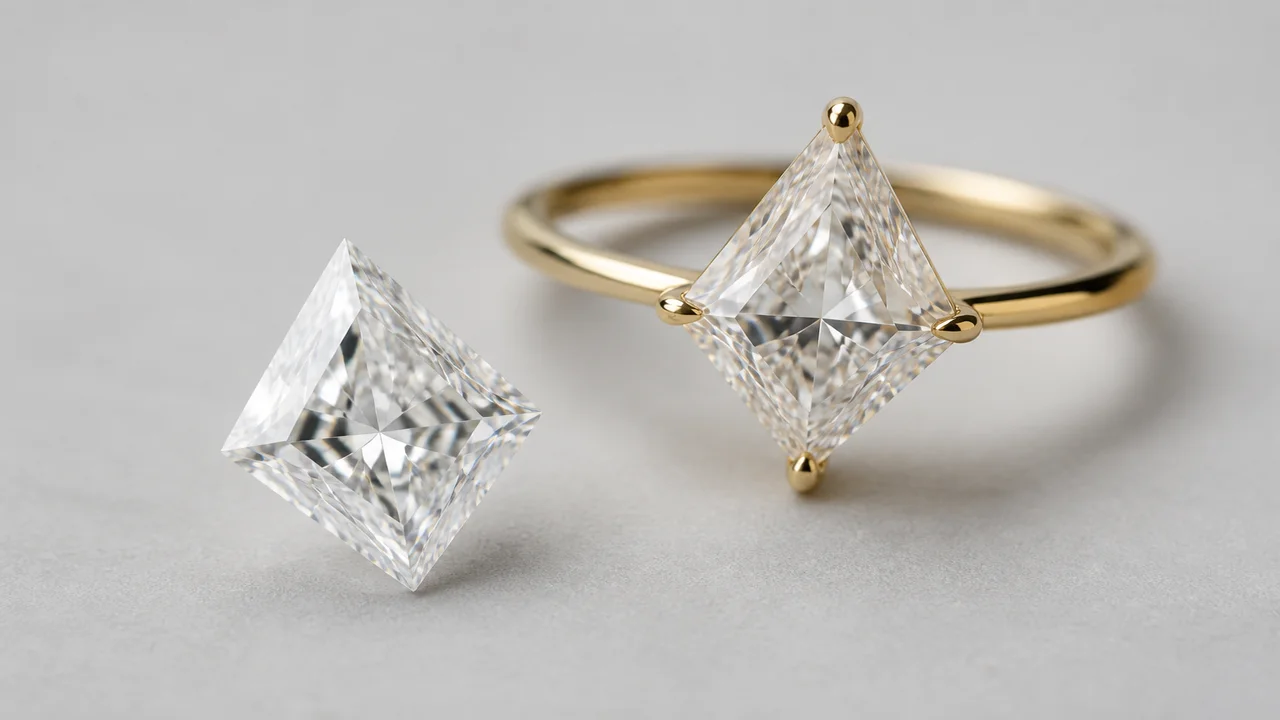
A diamond identifier by photo is most useful for describing visible design: apparent stone shape, facet pattern, setting, prongs, halo, side stones, and ring style. It should not be used to authenticate the stone. Diamond, laboratory-grown diamond, moissanite, cubic zirconia, glass, and other materials can look alike in ordinary pictures.
Scope: Jewelry Identifier is not a certified appraisal or gemological laboratory. Photo output is visual identification, not proof of diamond species, natural origin, treatment, grade, carat weight, or value.


What a Diamond Identifier by Photo Actually Identifies
The tool sees pixels, not chemistry. A face-up photograph may support “oval-shaped colorless stone in a four-prong halo setting.” A profile may show a cathedral shoulder, basket head, bezel, tension-style mount, or elevated solitaire. Those details are valuable for cataloging and searching even when the material is unknown.
| Visible category | Examples | Safe wording |
|---|---|---|
| Outline or shape | Round, oval, pear, emerald, marquise | “Apparent oval shape” |
| Facet style | Brilliant, step, mixed, rose-cut appearance | “Step-cut appearance” |
| Setting | Prong, bezel, halo, channel, pavé | “Four-prong setting” |
| Ring design | Solitaire, three-stone, cluster, toi et moi | “Three-stone style” |
| Condition | Visible chip, abrasion, loose prong, dirt | “Possible edge damage; inspect” |
Diamond Shapes You Can Describe From a Photo
Shape is the face-up outline, not a guarantee of material or grade. Round, oval, pear, marquise, heart, cushion, princess, emerald, Asscher-style, radiant, and baguette are common search terms. Old mine and old European cut labels require more than a vague outline because facet arrangement, culet, table, crown, and proportions matter.
Perspective can distort shape. An oval photographed at an angle may look round; a cushion can resemble a radiant; a square emerald-style stone can be confused with an Asscher-style cut. Center the camera over the table and add a straight profile. If the stone is small, use macro mode without digital zoom.
For ring-level vocabulary, pair this process with find ring style from photo.
Cut Style Versus Cut Grade
Cut style describes visible facet organization. Brilliant cuts use triangular and kite-shaped facets designed for brightness; step cuts use long parallel facets; mixed cuts combine approaches. Cut grade is a formal evaluation based on measurements, proportions, polish, symmetry, and light-performance criteria. A phone image cannot calculate those factors reliably.
- A dark center may result from obstruction, exposure, dirt, or proportions; the photo alone does not diagnose it.
- Strong rainbow flashes may be camera processing or lighting and do not prove moissanite or diamond.
- A visible line can be a reflection, inclusion, scratch, facet junction, or crack.
- Rounded facet edges may suggest wear or a softer simulant, but focus and compression can create the same look.
Use photo language to form questions for a jeweler, not to assign a laboratory cut grade.
Identify the Setting and Ring Style
The setting often produces a more reliable photo result than the stone. Count visible prongs and note their shape. Look for a full or partial bezel, a halo around the center, channel-set shoulders, pavé beads, an illusion plate, a cluster, or side baguettes. In profile, identify the basket, peg head, cathedral shoulders, bridge, and gallery rails.
| Setting clue | What it suggests | Next photo |
|---|---|---|
| Single raised center | Solitaire or solitaire-with-accent design | Side profile and shoulders |
| Small stones encircle center | Halo setting | Macro of joins and prongs |
| Metal rim surrounds stone | Bezel or semi-bezel | Profile and underside opening |
| Three prominent stones | Three-stone design | Straight top view with scale |
| Many stones form one outline | Cluster or composite style | Macro showing individual stones |
Setting construction can also reveal repair needs. A photograph may flag a lifted prong, but only hands-on inspection can decide whether the ring is safe to wear.
Photo Workflow for Better Identification
- Place the clean ring on a plain matte background near diffused daylight.
- Take a centered face-up image to document shape and facet pattern.
- Take both profiles and a three-quarter view for setting height and construction.
- Photograph the underside, gallery, shoulders, and every stamp inside the band.
- Add a ruler view and record stone length and width in millimeters if safely measurable.
- Submit the clearest unfiltered images, then compare suggested terms across several trusted references.
- Save uncertain observations as questions for a jeweler or gemologist.
Avoid flash hotspots, beauty filters, portrait blur, screenshots, and marketplace images stripped of detail. Review phone ring-identification tips for a complete capture process.
What the Photo Can and Cannot Prove
| Photo can support | Photo cannot prove |
|---|---|
| Apparent shape and facet arrangement | Diamond versus simulant |
| Setting, prongs, halo, side-stone layout | Natural versus laboratory-grown origin |
| Visible stamps and report-number leads | That a stamp or report belongs to the stone |
| Approximate dimensions with a scale | Exact carat weight or grade |
| Visible chips, abrasion, dirt, or loose metal | Internal treatments or complete condition |
| Similar designs and style vocabulary | Certified appraisal or market value |
When to Use a Jeweler or Gemological Laboratory
Seek professional testing before a purchase, resale description, insurance schedule, estate division, or repair decision. A jeweler may screen the stone and inspect the mounting; a laboratory can provide formal identification and grading where appropriate. Match any report number through the issuer’s official database and confirm that measurements and inscriptions correspond to the stone.
If your next question is price, read how much is my diamond worth. Value requires verified identity, dimensions or carat weight, grade evidence, condition, and a defined market—not just an attractive image.
Frequently Asked Questions
What can a diamond photo identify?
A clear photo can support apparent shape, facet style, setting type, prong count, ring style, and visible condition observations.
Can a photo confirm a real diamond?
No. A standard photo cannot confirm diamond, separate natural from laboratory-grown diamond, or reliably rule out moissanite and other simulants.
Is diamond shape the same as cut grade?
No. Shape is the outline, such as round or oval. Cut grade is a laboratory assessment of proportions and light performance for applicable stones.
Which photos work best?
Use face-up, profile, three-quarter, underside, hallmark, and ruler views in diffuse neutral light, with the stone clean and sharply focused.
Can an app estimate diamond carat weight?
A photo may support a rough size comparison only when scale and measurements are known. Exact carat weight requires weighing a loose stone or using professional measurement estimates.